eFill Signatures

info@efillsignatures.com +91-973 181 5486

How to Check Digital Signature Validity and Expiry Date?

Every Digital Signature Certificate (DSC) issued in India comes with a validity period — usually 1, 2 or 3 years. After expiry, it becomes invalid and needs to be renewed to continue using it on government portals like MCA, GST, DGFT, Income Tax, or EPFO.

If you’re unsure whether your Digital Signature is still valid or expired, you can easily check its validity and expiry date using the following simple methods.

Method 1: Check Validity Using Your Computer

Follow these steps to check the validity and expiry date of your DSC from your Windows computer:

  • Insert your USB token (ePass, WatchData, ProxKey, etc.) into your computer.
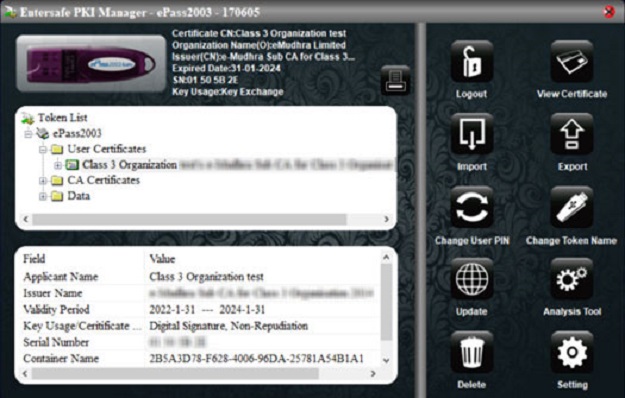
  • Open the token management tool (for example: ePass 2003, WD ProxKey, or Safenet).
  • Click on “Certificates” or “My Certificates” section.
  • Select your Digital Signature Certificate.
  • You’ll see details such as:
    • Certificate Holder Name
    • Issuer (CA Provider)
    • Validity Period
    • Expiry Date

Tip: If your DSC is expiring soon, renew it before the expiry date to avoid disruption in your filings.

Check DSC Validity and Expiry Date

Method 2: Check Validity Using Browser (Google Chrome / Firefox)

You can also check DSC details directly from your browser:

  • Open your browser and go to Settings -> Privacy & Security -> Certificates -> View Certificates.
  • Insert your USB token.
  • Your DSC will appear under Personal Certificates.
  • Double-click on it to view the Validity Period and Expiry Date.
  • This method is quick and works for all types of DSCs issued by eMudhra, VSign, PantaSign, Capricorn, and SpeedSign.
What is a Digital Signature?

Why Checking Your DSC Validity Matters

Keeping your DSC active ensures uninterrupted access to government e-services and compliance platforms. Expired DSCs can cause errors such as:

  • Failure in e-filing or GST submissions
  • Inability to sign MCA or DGFT forms
  • Delay in tender or contract submissions

By regularly checking and renewing your DSC, you ensure smooth digital operations for your business or profession.

Renew Your DSC Before It Expires

If your Digital Signature is nearing expiry, renew it online with eFill Signatures in just a few minutes. We provide:

  • Paperless renewal (Aadhaar / Video KYC)
  • Instant processing
  • Support for all CAs – eMudhra, VSign, PantaSign, Capricorn & SpeedSign
  • Expert support via call or WhatsApp

Frequently Asked Questions (FAQ)

Q1. How can I check the expiry date of my Digital Signature Certificate (DSC)?

You can check your DSC’s expiry date by inserting your USB token into your computer, opening the token management software (like ePass 2003, WatchData, or ProxKey), and viewing the certificate details. The validity and expiry date will be displayed there.

Q2. What is the validity period of a Digital Signature Certificate?

A Digital Signature Certificate (DSC) is typically valid for 1, 2 or 3 years from the date of issuance. After that, it must be renewed to continue using it for e-filing, MCA submissions, or government-related services.

Q3. What happens if my Digital Signature expires?

Once your DSC expires, it becomes invalid and can no longer be used for signing or authentication. You must renew your DSC from an authorized provider like eFill Signatures to restore access to online services such as GST, MCA, Income Tax, EPFO, and DGFT portals.

Q4. Can I renew an expired Digital Signature Certificate?

Yes, you can renew your expired DSC online through eFill Signatures. The renewal process is paperless, requires Aadhaar or PAN verification, and usually completes within a few hours.

Q5. How do I know which CA issued my Digital Signature?

You can find the issuing Certifying Authority (CA) by checking your DSC details in your USB token software or certificate properties. The CA name (e.g., eMudhra, VSign, PantaSign, Capricorn) will appear under the Issuer field.

Q6. Do I need a new USB token when I renew my DSC?

Not necessarily. If your token is active and supports renewal, you can use the same USB token for your new certificate. However, if it’s damaged or locked, you may need a new token.

Q7. Can I check DSC validity on a mobile phone?

Currently, checking DSC validity works best on a desktop or laptop, as it requires USB token access. However, you can verify certificate status through the CA provider’s website on mobile if you have the certificate serial number.